
Across assessments, it’s increasingly common for teams and vendors to provide structured data, configuration outputs, system exports, or collections of supporting documents as evidence. Engage has expanded its attachment capabilities in order to better support these real-world workflows. By making it simpler for Engage users to upload the formats they use on a daily basis, this improvement facilitates the submission of documents and improves the experience for both clients and vendors.
That’s why we're thrilled to introduce Extended File Type Support in Engage, which includes native support for JSON and XML files as well as an optional setting to enable ZIP file uploads, to streamline this process and make evidence submission more seamless.
So why does extended file type support matter?
Because it removes friction. By allowing JSON and XML uploads by default and giving Engage Administrators the option to enable ZIP files, Engage now makes it easier for Engage users to submit the formats they already work with. This update reduces effort, improves accuracy, and streamlines the entire assessment experience for both internal teams and vendors.
Key Considerations
- Uploads of XML and JSON are supported by default. There is no need for configuration.
- You can enable or disable ZIP uploads at an instance level in the Administrator Settings.
- Engage Users will encounter a validation error and be unable to upload ZIP files if ZIP support is disabled.
- Engage Users can easily upload ZIP files as part of their assessment response once ZIP support is enabled.
- Extended File Type support is available for both vendors and internal business users.
- Engage supports ZIP files with a maximum of five levels of nested archives. If a ZIP file exceeds this depth, the upload will not be allowed. In such cases, Engage users will see an error message stating “Unexpected error adding your file" while the detailed error is captured in the backend for review.
Feature Overview
JSON and XML Uploads
Engage Users can now attach JSON and XML files directly within assessments, making it easier to submit documents without converting or restructuring the content.
JSON File Upload
XML File Upload
ZIP File Upload Control in Engage Administrator Settings
In the Administration tab under Settings, you'll now see an Attachments section located below AI Autofill. This section includes a single option: Enable ZIP Upload. Engage Administrators can control the ZIP upload access through this checkbox. ZIP uploads are controlled at the instance level to give organizations flexibility based on policy or compliance requirements.
By default, ZIP support is turned off.
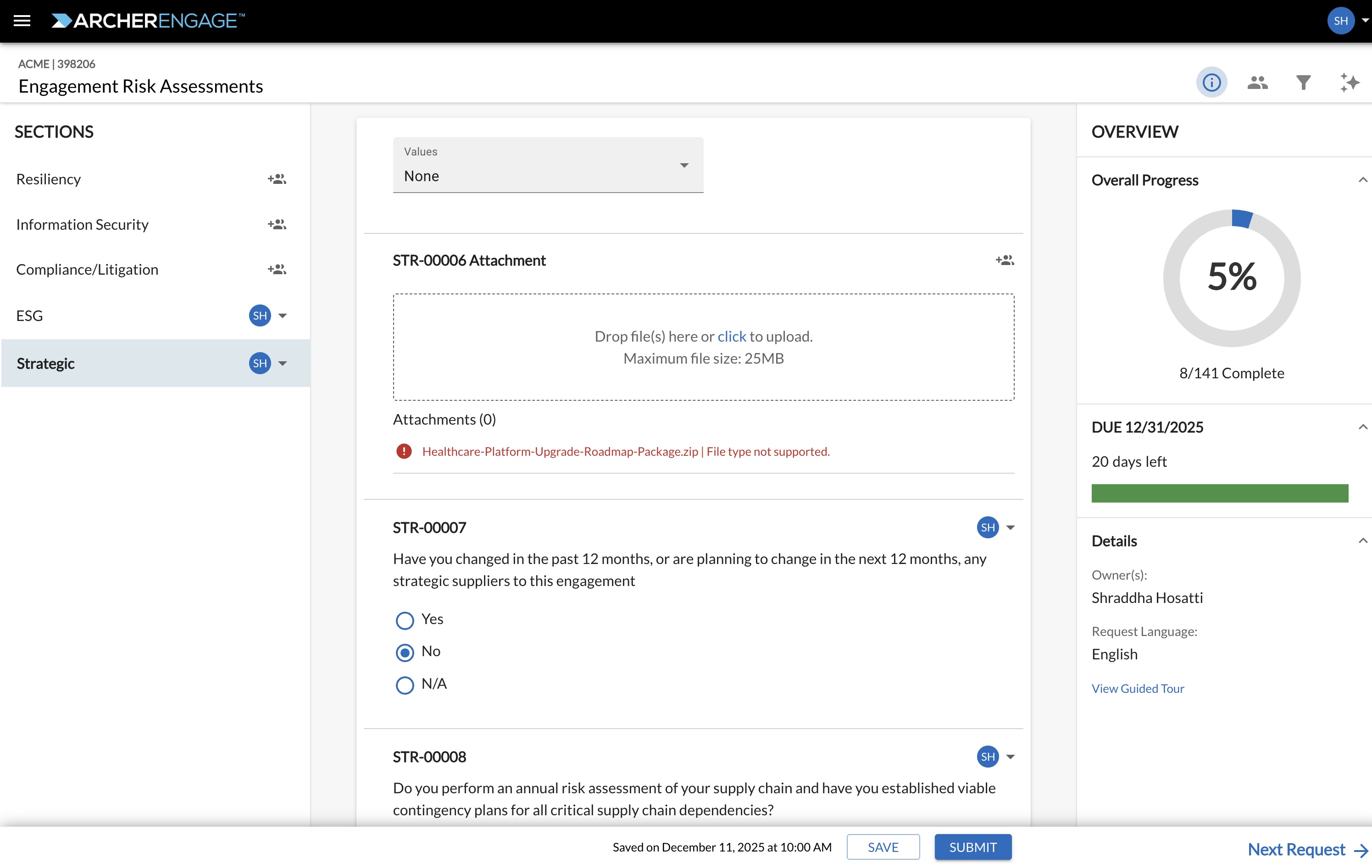
User Experience When ZIP Support Is Disabled
If a user attempts to upload a ZIP file while the setting is turned off, Engage will display a message indicating that ZIP file type is not supported.
This prevents confusion and helps vendors understand exactly why a ZIP file cannot be added.
 Enabling ZIP Upload Support
When Engage administrators enable ZIP support, Engage users gain the ability to upload ZIP files within assessments immediately.
Uploading a ZIP File Successfully
Once enabled, ZIP files can be added like any other attachment, making it easier to submit collections of documents.
Frequently Asked Questions
Do JSON and XML require Engage Administrator configuration?
No. JSON and XML uploads are supported by default and require no setup or enablement from Engage administrators.
Does enabling ZIP support affect other file types?
No. Enabling or disabling ZIP uploads does not impact support for other file types.
Are all file types inside a ZIP allowed, even if Engage doesn’t support them individually?
Yes. When a ZIP file is uploaded, all internal file formats are accepted, regardless of whether those formats are supported as standalone attachments in Engage. The ZIP file is treated as a single entity, and its contents are not validated against Engage’s individual file-type restrictions.
Will the system the validate the contents of a ZIP file?
Engage platform only performs standard security scanning for malware on the ZIP as part of the upload process.
Can Engage administrators enable or disable ZIP support at any time?
Yes. ZIP upload support can be toggled on or off at any point in Engage Administrator Settings. Changes take effect immediately for all assessments in that instance.
What happens if a user attempts to upload a ZIP file while ZIP support is disabled?
The system will display an error message indicating that ZIP uploads are not supported. The file will not be accepted until an Engage administrator enables ZIP support.
Are there any file size limits for ZIP, JSON, or XML uploads?
Standard attachment size limits continue to apply which is set at Archer end while creating the assessment. These limits are consistent across all supported file types.
Comments
0 comments
Please sign in to leave a comment.